2026년 10월 24일 토요일
클로드에 브랜드 자료와 참고 영상을 주고 프로모션 영상을 만들었습니다.
AI가 모션 디자인을 어디까지 할 수 있는지 궁금했습니다. X에서 모션 스튜디오를 세팅하는 글을 찾았습니다. 글을 따라 도구를 설치하고 작업 지침을 넣은 뒤 Synex 템플릿 브랜드로 영상을 제작했습니다.
Claude Code에 HyperFrames를 설치해 영상을 만들고 출력했습니다. Figma MCP를 연결해 브랜드 자료를 가져왔습니다. 설치는 macOS에서 진행했습니다.
참고한 글에서 가져온 작업 지침입니다. 작업 폴더에 CLAUDE.md 파일을 만들고 아래 내용을 붙여넣습니다.
클로드는 이 지침에 따라 브랜드 자료와 참고 영상을 분석합니다. 제작 전에는 몇 초에 어떤 화면을 보여줄지 정리한 구성안을 제안합니다. 문구와 움직임, 음악과 효과음도 함께 정리합니다. 내용을 확인하면 영상을 만들고 결과를 점검하며 수정합니다.
# Motion studio rules

## Source of truth: ./refs/
- ./refs/ holds the reference video, brand guide, logo, fonts and style frames.
- Read every file in ./refs/ before planning. Identify each file's role from its name and contents.
- Priority when they disagree: brand guide > style frames > reference video > your own defaults.
- Brand guide decides logo usage, colors and fonts. Use the font files in ./refs/, never substitutes.
- The reference video decides pacing, transitions, camera moves and motion feel
(easing, bounce, overshoot). Match its motion feel; do not impose your own.
- Take the grammar of the reference, never its content, logos or characters.

## Tools
- Build and render with the HyperFrames plugin (/hyperframes:hyperframes).
- For SaaS or product videos that show UI, use the 21st MCP to build clean UI components,
then animate them. Never draw product UI from imagination when real screenshots exist.

## Workflow (gates, do not skip)
1. Extract one frame every 0.5s from the reference video with ffmpeg and study them.
2. Write docs/style_guide.md: palette, type, motion feel, shot lengths, transitions, sound feel.
3. Write docs/shotlist.md: every shot with timing, visuals, text, motion and sound.
4. Show me both files and wait for my OK before writing code.
5. Build, then run the critique loop below, then do the final render.

## Avoid AI-video defaults (unless refs ask for them)
- Centered title on a gradient, everything fading in, a logo dropped in at the end.
- Corner labels and frame borders, generic particle bursts, dead seconds with nothing happening.

## Sound
- If a track is in ./refs/, use it and sync cuts to its beats.
- If not, ask me before synthesizing music.

## Critique loop before showing me a render
1. Render a contact sheet and LOOK at it.
2. Score 1-10: hook in first 2s, readability at phone size, match to reference motion,
brand accuracy, variety, sound sync.
3. Fix the 3 worst problems. Repeat until every score is 8+.
4. Show me the contact sheet and scores, then do the full render.
폴더 구조는 아래와 같이 구성합니다.
motion-studio/
├── CLAUDE.md
├── refs/
├── docs/
└── out/refs에는 브랜드 가이드와 그래픽, 폰트와 참고 영상을 넣습니다. 클로드가 작성한 분석과 구성안은 docs에 저장하고 완성 영상은 out에 추가됩니다.
Synex 템플릿에 사용한 브랜드 자료로 영상을 요청했습니다. 로고와 그래픽, UI와 목업을 모아둔 피그마 링크를 클로드에 전달했습니다.
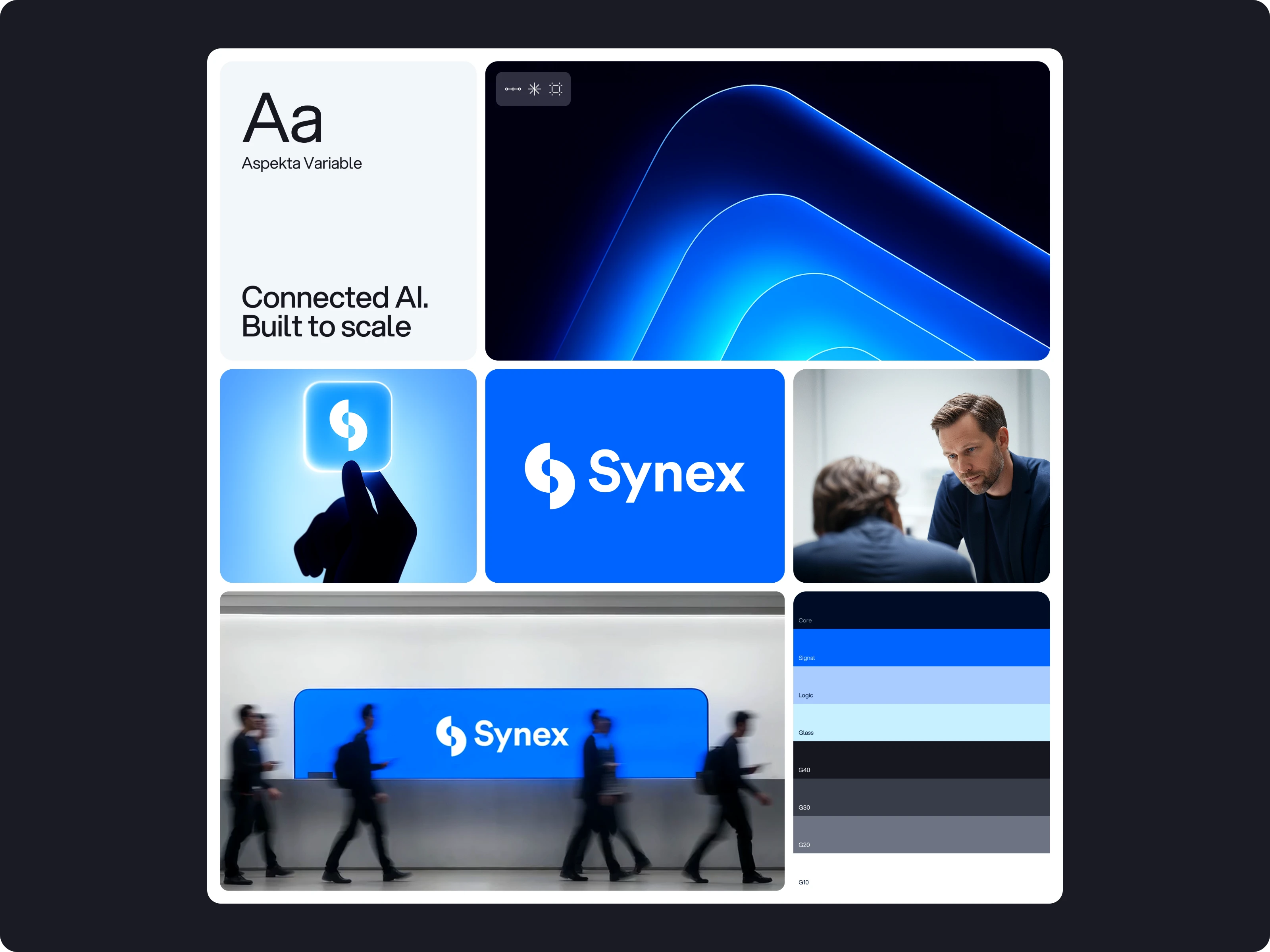
레퍼런스로 Robinhood와 Walmart 영상 두 개를 사용했습니다. Robinhood 영상에서는 컷과 카드 움직임을 참고하게 했습니다. Walmart 영상에서는 컬러로 화면을 채우고 이미지를 배치하는 방식을 참고하게 했습니다.
자료를 전달하고 아래처럼 요청했습니다.
AI SaaS 브랜드를 위한 프로모션 영상을 만들어줘. 브랜드 가이드를 확인해서 로고, 색상, 서체, 이미지 등을 사용하면 돼.클로드가 자료를 읽고 스토리라인을 짜왔습니다.
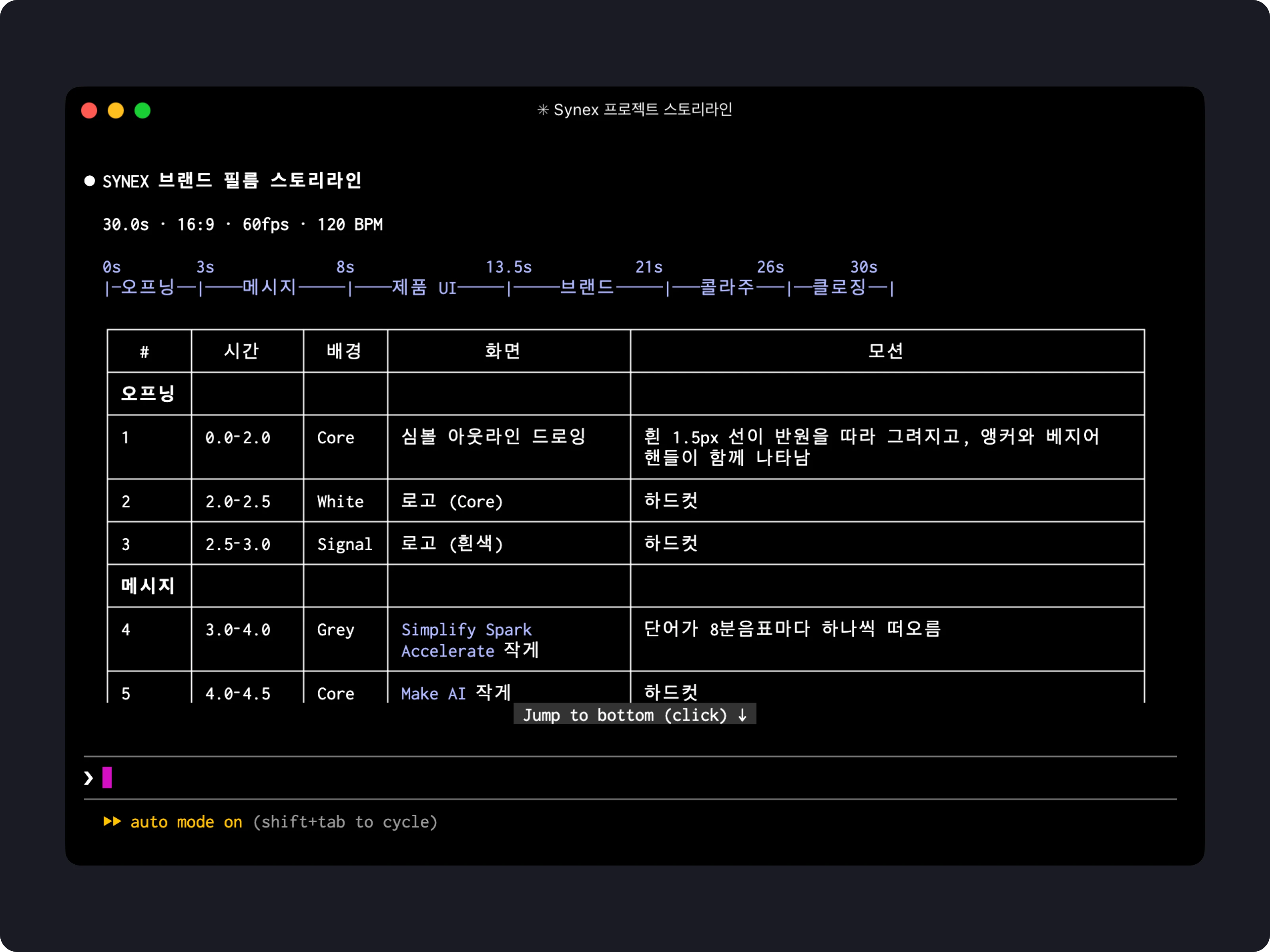
장면마다 어떤 내용을 보여줄지 정하고 사용할 그래픽과 움직임을 제안했습니다. 저는 이미지와 문구, 장면 순서를 확인하고 제작을 요청했습니다.
클로드는 피그마에 있던 대시보드를 활용해 숫자와 차트에 움직임을 붙였습니다. 브랜드 이미지와 목업도 영상에 넣었습니다.
HyperFrames에서 영상을 보며 수정할 부분을 전달했습니다.
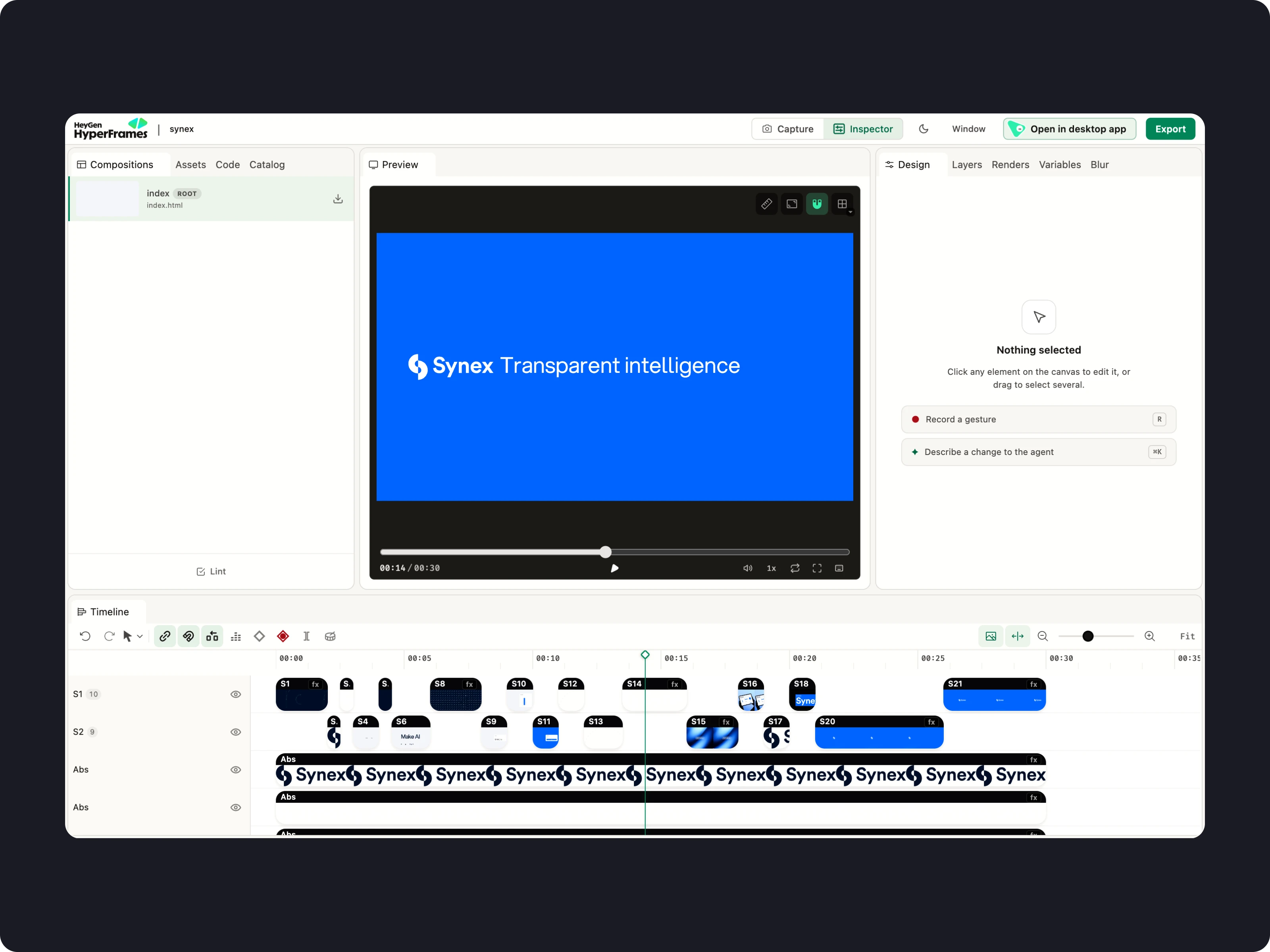
클로드가 화면 구성과 로고 움직임, 장면 전환을 수정하면 다시 재생해 확인했습니다.
음악과 효과음도 클로드가 제안했습니다. earshot 분석을 바탕으로 클로드가 화면 움직임과 컷 전환에 맞춰 사운드 타이밍을 조정했습니다.
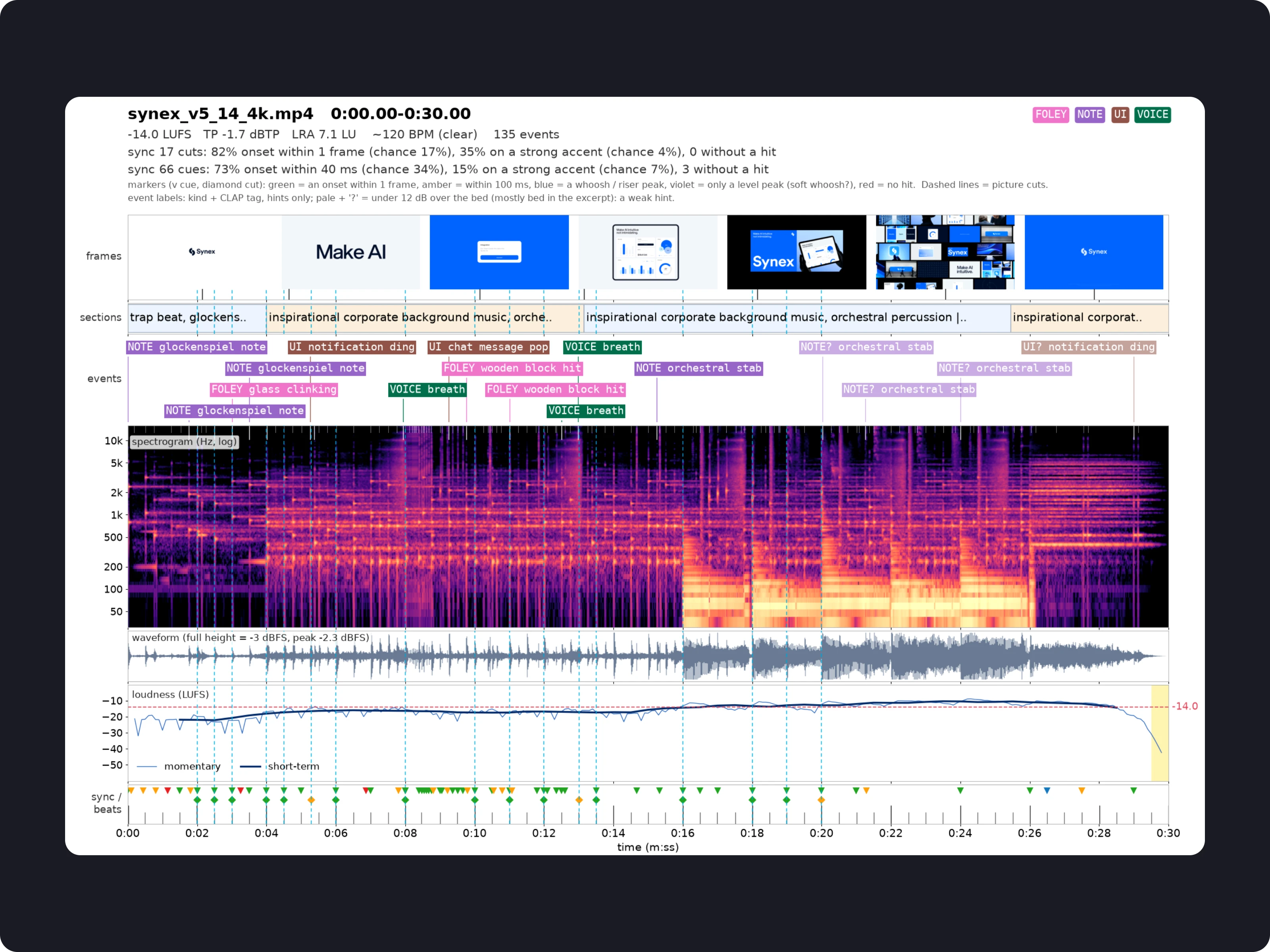
화면과 사운드를 확인한 뒤 4K·60fps MP4로 출력했습니다.